AI Systems Architecture • 0-to-1 Product Design

Deck Builder: Designing the 0-to-1 AI Presentation Engine

Role
Lead Product Designer & System Architect
Timeline
August 2026
Platforms
Python Core & B2B SaaS Integration
Key Focus
Systemic Heuristics, Validation Loops, Brand Kits

The Challenge

In enterprise settings, presenting raw regulatory filings, manuals, or FDA guidelines requires turning hundreds of pages of dense documents into polished slide decks. However, standard LLM slide generation suffered from the "Depth Paradox"—either producing high-level summaries that missed critical context, or direct translations that resulted in walls of text.

Additionally, automated diagramming engines frequently generated visuals that violated corporate guidelines, produced overlapping layouts, or hallucinated raw hex colors directly into the output.

My objective was to move beyond static screens and architect a programmatic PowerPoint pipeline that handles document parsing, brand-compliant styles, and structured diagramming dynamically, ensuring 100% brand consistency without human-in-the-loop design cleanups.
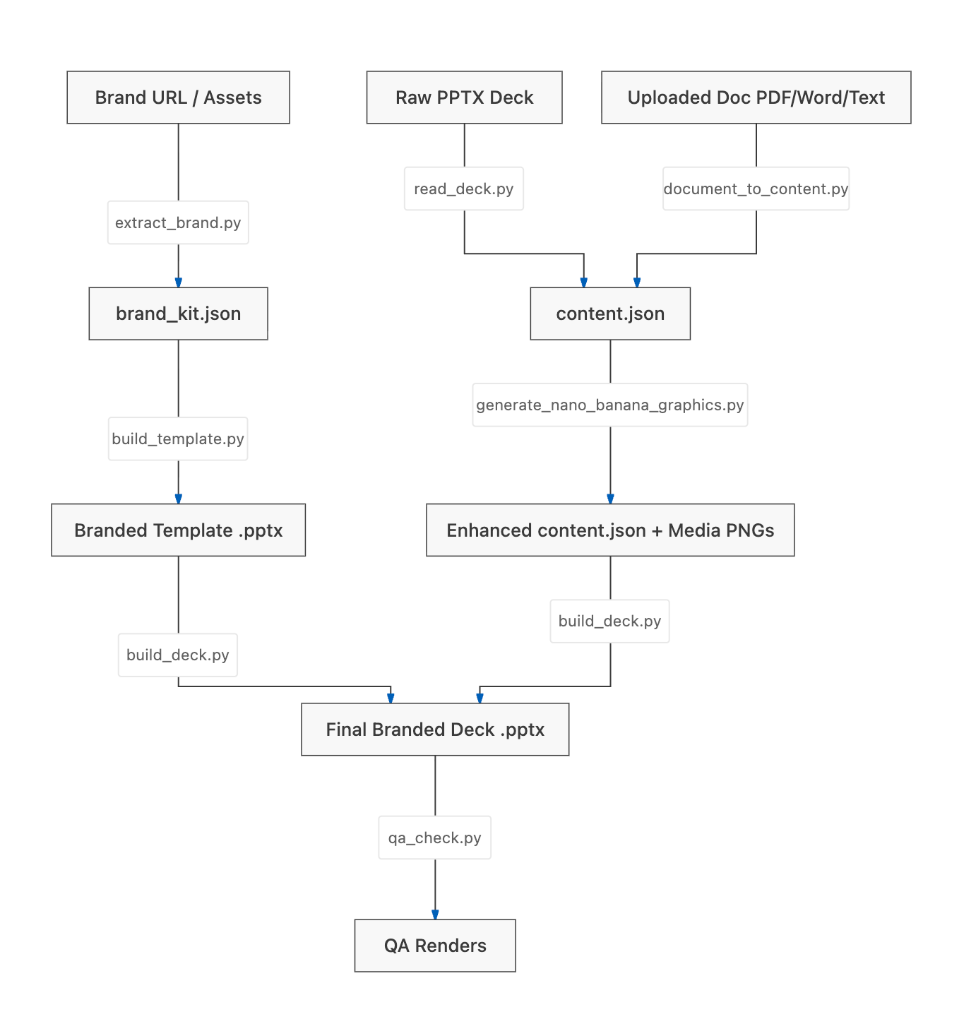
Deck Builder AI Generator Pipeline Architecture Diagram

The Pipeline Evolution

Following a strategic alignment with my CEO on leveraging LLMs for chunked content generation, I designed and tested two parallel pathways to address the diverse depth requirements of executives and analysts:

  • The Generate Pipeline: Focused on speed and summarization. It ingested documents, chunked text to a user-specified slide count, and dynamically assigned layouts (`content`, `two_content`, or `caption`).
  • The Enhance Pipeline: Focused on full-depth mapping. It parsed documents slide-by-slide, preserving details while running a selective visual check to see if diagrams could improve bullet readability.

After evaluating both pathways with Claude, they proved to be an even match, yet each was lacking. This led me to architect the Hybrid Pipeline:

The Hybrid Pipeline first chunks source material to the user's target slide count and extracts summaries. Then, rather than forcing an image model to invent diagrams from prose, I integrated Mermaid JS. The pipeline uses Mermaid to generate a clean, structurally accurate chart baseline, which is then passed to my image model, Nano Banana, to enhance it into a polished corporate visual.

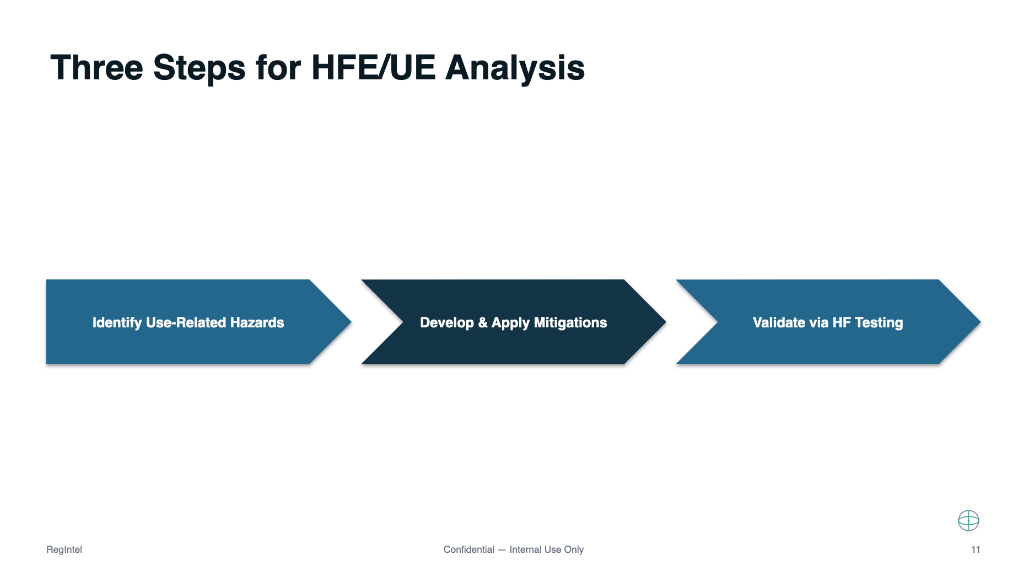
Input: Raw Document Slide / Chevron Baseline
Raw document slide before enhancement

Before: Raw unstructured slide content parsed during chunking with basic inline chevrons.

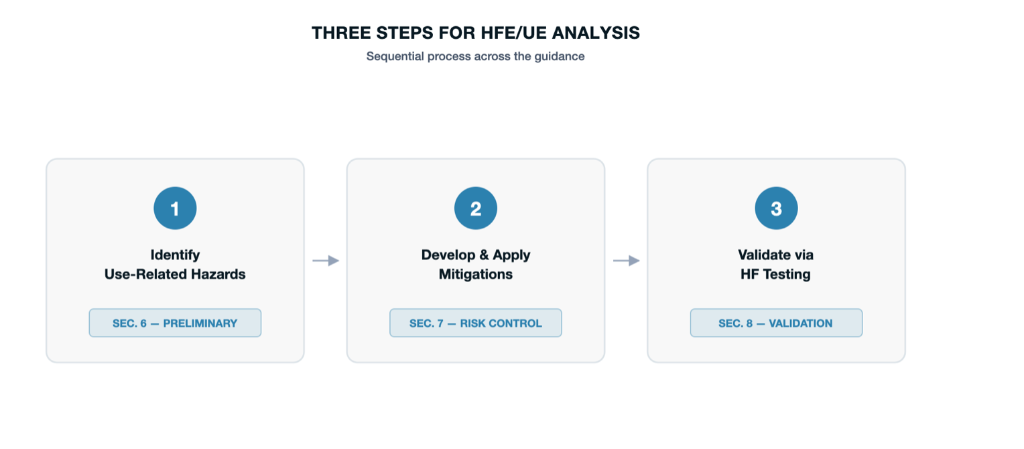
Output: Nano Banana Enhanced Diagram
Nano Banana enhanced branded diagram

After (Enhance Pipeline): Restructured into sequential numbered cards with section badges, refined typography, and strict brand alignment.

Designing for AI Uncertainty

In AI product design, the interface's behavior during a model failure is just as critical as its success. I designed a multi-gate verification workflow to ensure layouts degrade gracefully:

Selective Visual Pre-checks

Before attempting to generate an image, the system runs a `wants_diagram` check to evaluate the slide context. If a visual won't aid readability, it skips generation entirely to save compute and prevent visual noise.

The Multi-Gate Verification Loop

For slides that do require diagrams, the generation goes through a strict validation chain with a layered safety mechanism called **Multimodal Text Verification (OCR)**:

01. Syntax
Validates Mermaid chart code
02. Grounding
Verifies diagram labels match bullet text
03. OCR Check
Vision verification of label drift & readability

To prevent visual distortions, the pipeline executes a three-step text verification check:

  1. Mockup Generation: The system first renders a clean, vector-based Mermaid flowchart mockup.
  2. AI Enhancement: This mockup is fed into **Nano Banana** to enhance it into a polished corporate visual.
  3. Vision Verification: The system executes a Google Gemini vision check to read and parse the text labels in the enhanced image.

If the vision model detects that the labels have drifted, warped, or blurred below a 70% readability threshold, the pipeline discards the enhanced **Nano Banana** image and gracefully falls back to the clean, brand-colored Mermaid mockup diagram. If the Mermaid generation itself fails or throws code syntax errors, the slide falls back to a text-only content layout—ensuring that users always receive an aesthetically consistent, readable slide.

Deterministic Branding

Design system governance shouldn't rely on probabilistic models following instructions. I took a hybrid approach to branding:

Programmatic Color Ingestion

The system loads raw brand guides from a `brand_kit.json` file and normalizes them into a fixed internal schema. These values are interpolated directly into the enhancement prompts.

Mermaid Class Directives

Rather than asking the image generator to color-correct the graphic, I built `inject_brand_style()`. This function programmatically writes the hex colors into the Mermaid source code using class definitions before rendering—ensuring color alignment is deterministic and guaranteed.

Squashing the "Hex-Color" Hallucination

During testing, **Nano Banana** occasionally printed raw color hex codes (e.g., `#2A7DA9`) as watermarks on the slides. To fix this, I updated my LLM prompts with negative instructions: "Do NOT write, print, or draw the raw hex color codes... as text labels, watermarks, or annotations anywhere on the generated image."

Current Status & Next Steps

With the core programmatic pipeline running and producing beautifully formatted PowerPoint files, the next phase of the project shifts to user-facing experiences.

I am currently designing the web interface that allows users to ingest brand guidelines, preview generated slide manifests (`content.json`), manually override fallback states, and choose custom editorial themes before executing the pipeline.

Want to see the next case study?


Next Project: Design System

Back to Portfolio